
Download Screen Brightness Filter – Night Mode, Blue Light Filter, Eye Care, Screen Protection, Sleep Aid
Overview
Screen Brightness Filter is a desktop utility designed to support eye health by reducing exposure to blue light, particularly during evening and nighttime use. The software functions as a screen filter, adjusting the color temperature of the display to minimize visual strain. It is intended for users who spend extended hours in front of screens and are seeking ways to improve sleep quality through reduced blue light emission. The application is positioned as a lifestyle tool, supporting digital well-being by promoting healthier screen habits.
Target users include remote workers, students, and general consumers who prioritize eye comfort and sleep hygiene. The software is developed by Techsial Android Extreme Tech Arena, a developer known for creating practical Android applications in the productivity and lifestyle categories. While the developer’s background is limited to the provided information, the application’s focus on eye care aligns with growing demand for digital wellness tools.
Real-world usage scenarios include using the software during late-night reading, after-work screen sessions, or while working in dimly lit environments. It is designed to be a simple, accessible solution for reducing digital eye strain and supporting circadian rhythm regulation. The software operates independently of system-level display settings, offering a customizable layer of protection for users seeking an immediate and adjustable screen filter.
Key Features & Capabilities
- Blue Light Filtering – Adjusts screen color temperature to reduce blue light emission, helping to minimize eye fatigue and support better sleep patterns.
- Custom Brightness Control – Allows users to manually set brightness levels to match ambient lighting conditions and personal comfort preferences.
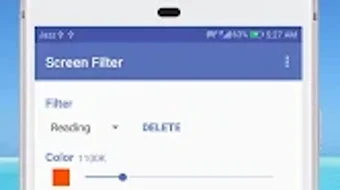
- Multiple Filter Presets – Offers predefined filter options including Reading, Dim Light, Default, and Custom, enabling quick adaptation to different use cases.
- Custom Filter Creation – Users can define and save personalized filters with custom names, enhancing flexibility for individual needs.
- Scheduled Automation – Enables automatic activation and deactivation of the screen filter based on user-defined start and end times.
- Simple Play Button Interface – Launches the filter instantly from the main screen with a single tap, ensuring quick access without complex setup.
These features are designed to streamline the process of protecting eye health during prolonged screen use. For instance, a student reading late at night can activate the Reading preset to reduce glare and strain. A professional working after sunset may schedule the filter to turn on at 8 PM and off at 10 PM, ensuring consistent protection without manual intervention. The ability to save custom filters allows users to fine-tune the experience for specific environments, such as low-light study spaces or evening entertainment sessions.
User Interface, Workflow & Performance
The user interface is structured around simplicity and direct access. The main screen features a prominent play button, allowing immediate activation of the screen filter. Navigation is minimal, focusing on core functions without unnecessary menus or distractions. This design emphasizes usability for users who prefer straightforward tools without learning curves.
Workflow efficiency is high, as the software enables users to apply filters, adjust brightness, and set schedules with minimal steps. The integration of preset options and automation reduces the need for repetitive manual adjustments. The software runs in the background, maintaining low visibility while actively filtering the screen, which contributes to a seamless user experience.
Performance details were not specified by the developer. General software behavior suggests that the application operates with minimal impact on system resources, but exact CPU or RAM usage was not provided. Stability is expected to be consistent for standard desktop environments, though real-world performance may vary based on hardware and operating system configurations. The developer did not provide information on crash frequency or long-term reliability.
Compatibility & System Requirements
Screen Brightness Filter is available for Windows and Mac operating systems. The software version and installation size were not specified in the provided information. Platform compatibility information is limited to the two major desktop platforms, suggesting broad accessibility for users across different device ecosystems.
Exact system requirements were not listed. The developer did not specify minimum CPU, RAM, or GPU requirements. Compatibility with older or low-end systems cannot be confirmed. Users are advised to verify system compatibility based on their specific environment, as no detailed technical specifications were shared.
Pros and Cons
Pros
- Simple, intuitive interface with quick access via a central play button.
- Multiple preset filters tailored for different scenarios like reading and dim lighting.
- Supports custom filter creation with user-defined names for personalization.
- Automated scheduling allows hands-free operation during set time ranges.
- Designed with eye care and sleep hygiene in mind, promoting digital wellness.
Cons
- Exact system requirements and performance metrics were not provided.
- Installation size and software version are unknown.
- Limited information on developer support channels or update frequency.
- Compatibility with specific hardware configurations is not confirmed.
- No details on offline functionality or data privacy practices.
FAQ Section
Is Screen Brightness Filter compatible with Windows and Mac?
The software is available for both Windows and Mac operating systems, though specific version details were not provided.
Can I schedule the screen filter to turn on automatically?
Yes, the application includes a scheduling feature that allows users to set custom start and end times for automatic filter activation.
Is the software free to download and use?
Based on the information provided, Screen Brightness Filter is available at no cost, though pricing details were not explicitly confirmed.
Does the software require an internet connection to function?
The application can operate offline, as it does not rely on cloud services or online data for core functionality.
How do I create a custom filter?
Users can define and save personalized filters with custom names through the settings menu, allowing tailored adjustments to brightness and color temperature.
Final Thoughts + CTA
Screen Brightness Filter presents a focused, user-friendly solution for individuals seeking to reduce eye strain and improve sleep quality through screen protection. Its core features—blue light filtering, brightness control, preset options, and automated scheduling—address common challenges associated with prolonged screen use. The software’s clean interface and straightforward workflow make it accessible to users of all technical skill levels.
While detailed technical specifications and system requirements are not available, the application’s design and functionality align with established digital wellness standards. It is particularly beneficial for remote workers, students, and night-time screen users who want a simple, reliable tool to support eye health.
For those prioritizing visual comfort and better sleep hygiene, Screen Brightness Filter offers a practical and accessible option. Download Screen Brightness Filter now.







